AWS CDK: How to use CfnResource or Cfn Layer

What is AWS Cloud Development Kit?


If you've been in the world of AWS long enough, you've probably heard of CloudFormation (duh!) and AWS CDK (Cloud Development Kit). If you haven't - you should! Trust me, it's awesome!!! AWS CDK gives you the best of Imperative and Declarative when it comes to IAC (Infrastructure as Code). It allows you to:

  • Keep the entire code of your app on Git as a "single source of truth", making the best use of SCM tools such as version control and CI.
  • Use your favourite programming language (read: python!... and yes, I know AWS recommends TypeScript and the documentation is much better, but I'd still go with Python). In the end of the day, CDK is just a way for you to create and deploy CloudFormation Stacks.

How do I get started with CDK?

I'd highly recommend you to get familiar with CDK, and I'll leave 3 links you need to bookmark:

Piece of advice: use all these docs to create your own "how to", because... you'll see, the documentation still needs some work.


CDK Building Blocks

Constructs are the basic building block of CDK apps. They represent abstract “cloud components” which can be composed together into higher level abstractions via scopes. Scopes can include constructs, which in turn can include other constructs, etc. Constructors must always have:
            - Scope, which is normally 'self'
            - Id, as a local identity
            - Kwargs, a set of optional initialisation arguments, specific to each construct. For example, for Lambda, it will be runtime, code and handler, more details here.

The AWS CDK is shipped with an extensive library of constructs called the AWS Construct Library. The construct library is divided into modules, one for each AWS service. For example, if you want to define an AWS Lambda function, we will need to use the AWS Lambda construct library.

How complex is CDK?

It's actually pretty easy, if you're using the officially supported classes. But... what if you need "more stuff"?

Let me clarify this:
  • AWS CDK is awesome, but it can be challenging to use, since the documentation is not the best... especially if you're not using TypeScript.
  • In the official API reference, you'll see that there's an official way to create any resource. For example - for a DynamoDB Table, you'd go with an official class, MyDynamoDB = ddb.Table(), documented here.
  • Problem? As you can see in the link above, not all parameters are supported (panic mode: ON).
  • Solution: EVERYTHING you can do in CloudFormation, you can do using CDK (panic mode: OFF). You just need to not be scared to get electrocuted... a little. Every Official Class, has an CFN equivalent, that lets you use the EXACT parameters you're using to create CloudFormation Stack, but... in a different way.

Syntax for S3 CfnBucket or DynamoDB CfnTable

The whole reason I'm writing this, is that the official documentation, https://docs.aws.amazon.com/cdk/latest/guide/cfn_layer.html is simply wrong. 

We basically need to convert our good old CloudFormation Template written in JSON or YAML, into a Python code. Problem? Syntax isn't documented anywhere, and there are no examples on the web. I've spent the last few days trying to google "DynamoDB CfnTable KeySchema"... 0 hits! Even Google doesn't know about this.

Let's cut to the chase, let's say we've got the following CF Template in YAML, and we need to create a CDK Python code:


Resources:

  MyDynamoDb:
    TypeAWS::DynamoDB::Table
    Properties:
      AttributeDefinitions:
        - 
          AttributeName"project"
          AttributeType"S"
        - 
          AttributeName"owner"
          AttributeType"S"
        - 
          AttributeName"votes"
          AttributeType"N"
        - 
          AttributeName"members"
          AttributeType"N"

      KeySchema
        - 
          AttributeName"project"
          KeyType"HASH"
        - 
          AttributeName"owner"
          KeyType"RANGE"

      ProvisionedThroughput
        ReadCapacityUnits"5"
        WriteCapacityUnits"5"

If you refer to the official class, https://docs.aws.amazon.com/cdk/api/latest/python/aws_cdk.aws_dynamodb/Table.html you'll see that there is no Attribute Definitions... you're basically just given two parameters, "partition_key" and "sort_key", and that's it. So... what do you do, how do you define other Attributes?

IMPORTANT: This is just an example that I'm using to explain the syntax, please don't get into the philosophy of whether we need to be defining attributes while creating a DynamoDB table.

Here's the "trick". You basically need to find the python class that matches each of your properties. In this case, we're looking for a Key Schema and Attribute Definitions, and the corresponding classes are KeySchemaProperty and AttributeDefinitionProperty. Once you've figured this out, you need to "guess" how to form the entire syntax around it with no documentation to guide you. It would look something like this (make sure to note which are VARIABLES, and which are ARRAYS):

from aws_cdk import (
     core,
     aws_s3 as s3,
     aws_dynamodb as ddb,
)


MyDynamoDB = ddb.CfnTable(
     self, "MyDynamoDB",
     table_name="dynamodb-prod-unicorn",
     key_schema=[
          ddb.CfnTable.KeySchemaProperty(attribute_name="project",key_type="HASH"),
          ddb.CfnTable.KeySchemaProperty(attribute_name="owner",key_type="RANGE")
                            ],
     attribute_definitions=[
          ddb.CfnTable.AttributeDefinitionProperty(attribute_name="project",attribute_type="S"),
ddb.CfnTable.AttributeDefinitionProperty(attribute_name="owner",attribute_type="S"),
          ddb.CfnTable.AttributeDefinitionProperty(attribute_name="votes",attribute_type="N"),
          ddb.CfnTable.AttributeDefinitionProperty(attribute_name="members",attribute_type="S"),
                         ],
     provisioned_throughput=ddb.CfnTable.ProvisionedThroughputProperty(
          read_capacity_units=5,
          write_capacity_units=5
                        )
        )

This looks very complex, but it's actually quite simple. Also have in mind that this is ONLY in case you need to use a Property not supported by an official CDK construct, in this case aws-cdk_aws-dynamodb.Table .


Let me know in comments if this helped.
How failing VCDX changed my life


I started my professional career in 2003, in a NOC (Network Operations Center), making sure that Network and Security services of the VIP customers of the ISP (Internet Service Provider) ran smoothly. Till 2013, I mostly worked on big Network and Security design implementations for big European and Middle East companies, on Cisco and Juniper equipment, I got all the technical certifications (including CCIE). I jumped into Software Defined world and Virtualization as soon as it hit the market, and got my VCIX (VMware Certified Implementation Expert) Certification on Network Virtualization track (NSX, basically) soon after VMware acquired Nicira in 2014.

My point is that I did so many technical designs and implementations, mostly in Data Center environments, that when I found out about VCDX (VMware Certified DESIGN Expert), I was sue that I'd get it in the first attempt.

That did not happen. Not only that it didn't happen, but I faced one of the toughest wake up calls… ever!

What's VCDX all about?

VCDX is currently the most prestigious VMware Certification, held by less than 300 people in the world (check out the official directory). VCDX is NOT a technical certification. Even so, you need to be a SME (Subject Matter Expert) in all the areas that your Design covers.

VCDX is all about the community. The official VMware documentation and support is all right, I guess, but the community is one of the greatest I've ever stumbled upon. I'd actually like to seize this opportunity to thank some of the people who helped me while I was working on my design, and doing my mocks (mock is a practice design defence):

About my journey

Phase 1: Delusion

I came into a VCDX as a "great architect", and received such a slap of reality, understanding how much I actually didn't know. Yes, it's all about the WHY, and no matter how many times you hear this, you just don't get it until you start presenting your design to other VCDXs and candidates.

I learned SO MUCH about what good design needs to cover, and why it's so important that you understand how all the business requirements map into technical requirements, which drive 100% of your design decisions. I understood that if you have a Design Decision that you can't explain how you reached (what were the options, and how one of the requirements triggered that one, covering all the risks that it introduces and how you mitigate them) - you will simply fail.

If I can give you one advice, it's - be patient, and accept tips other VCDXs are giving you. They're not being mean, they really want you to pass.

Phase 2: Success

During VMworld 2018, I had a mock session where I presented my VCDX design to 6 VCDXs. It was brutal… The design I thought was bulletproof got destroyed to pieces. Result: I learned so much… It took me some time to recover from this experience, but once I did, I understood what an amazing privilege it was to actually have everyone listen to me for over an hour. This is when my mind just "clicked". I changed my design, and was approved for defence in the next available defence slot.

I had to change my design twice before it was approved for defence. I never got to defend it, but I still consider the journey a success for the following reasons:
  • I learned so much about what great design is. I switched to a complete different set of technologies (public cloud mostly), but everything I learned still applies, 100%, and I use it daily building Cloud architectures.
  • I learned hot to be more down-to-earth, and that I'm not a great architect. I still have so much to learn.
  • I understood what "it's all about WHY" means. Technology needs to help achieve business goals, being technically superior doesn’t mean you can make great designs.

Phase 3: Change of plans

I ended up changing jobs a few months before the defence date, which was unfortunate, because I had to focus on an entire new set of technologies that I didn’t have time to prepare my defence. Some may see this as a pity, after all the time and effort I invested, but to be honest - I don’t see it that way. I see it as a success story, as I still get to apply everything I learned… just on a different set of technologies.

Conclusion

I highly recommend you to go for VCDX. You might not get your number, you might get crushed while getting the design right, but I guarantee one thing - you will learn a lot, and became a much better architect then you currently are.

What is Service Mesh and do I need one?

Let's start with this - what problem does Istio solve?

Or... are we just using it cause it's the next cool thing? To be honest - there's a bit of both, from what I'm seeing with most of my customers.

To illustrate the problem Istio solves, lets take an example customer who already has their Kubernetes clusters. It doesn't matter on which cloud/data center k8s Masters and Workers are. SRE team is properly skilled, and operating the environment. The Developers see the great improvement as there's a clear improvement, plus an SRE team clearly understands what they need. Life is good.

Knock, Knock...

D: Oh... it's Marketing! Hello, Marketing, how can we help you?
M: Hey, Developers!!! How are you, bros? So... we have this super awesome new feature we'd like to test only in Southern Spain, and only on iPhones... and maybe just like half of the users if possible. How long do we need to do this?
D: ˆ%#$%!@ say... what??? Hey @SRE team, any chance Kubernetes can manage traffic management this granular?
SRE: Hmmm... How many people are we allowed to add to the team to operate the environment? Does potential business benefit justify contracting new SREs?

Enter - Service Mesh

And let's consider Istio, as my favourite Service Mesh at the moment...

There are 3 Core Features of Istio:

  1. Traffic Management: We can do Canary Testing, where we would like redirect 10% of traffic to the New version of the app. Or, create an algorithm that redirects an application to a different version, such as - iPhone users, let me route you over ... here.
  2. Security Authentication and Authorization: Identity is assigned to each Pod when it's spun up, and we can create rules and policies for ACL, to say what services they can access.
  3. Logging: Istio also has a dashboard in Grafana.


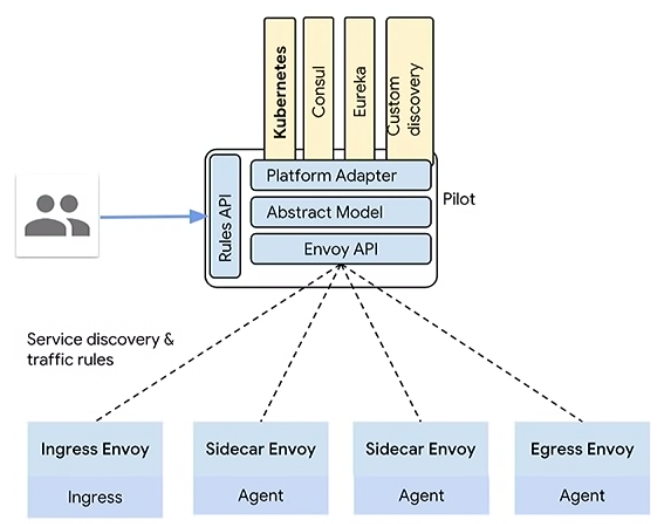
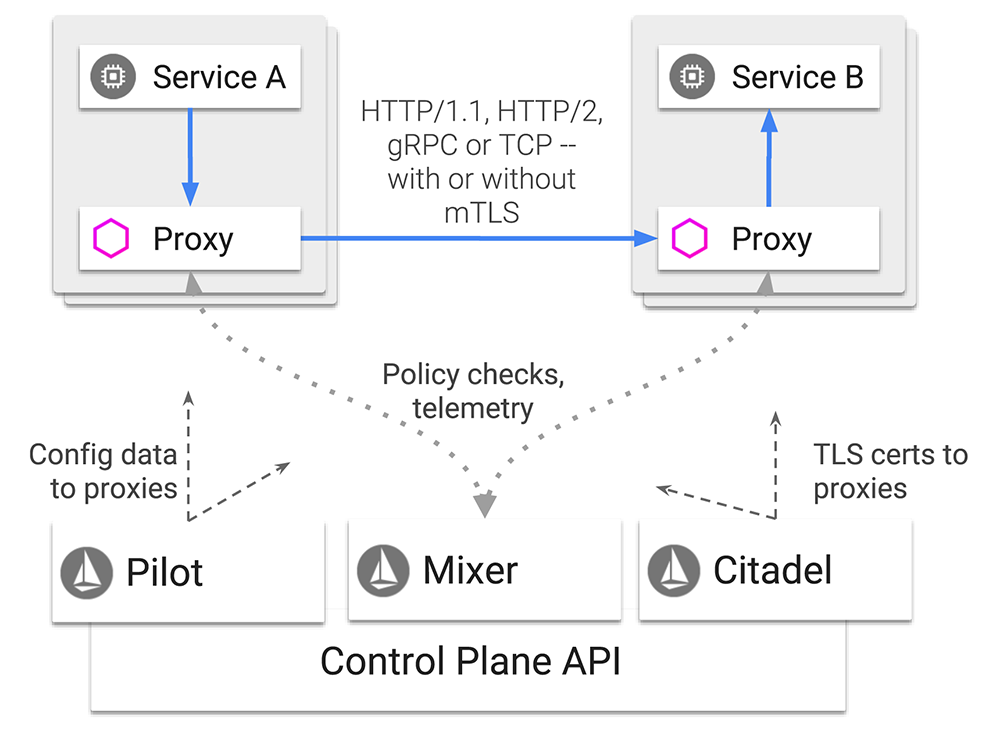
Istio is a CONTROL PLANE (adds a pluggable Control Plane), and a Service Mesh is an actual Data Plane. Everything that Istio does is via Envoy Proxy, which is a literal Sidecar that is spun up with EACH Kubernetes Pod.


What are some elements in the Istio architecture diagram above?

Pilot

Delivering config to the Proxies (Envoy). As a User you interact with the Pilot, through CLI, Automatically, or CI/CD. Pilot is in charge of:
- Service Discovery
- Intelligent routing
- Resiliency

Envoy Proxy

L7 Load Balancer, Sidecar for all the Containers. It's a literal Sidecar, and Envoy Proxy is deployed along with EACH of the Pods. It takes care of:
- Dynamic Service Discovery
- Load Balancing
- TLS Termination
- Health Checks
- Staged Rollouts

Mixer

Access control, quota checking, policy enforcement. Mixer keeps checking and getting reports if all Proxies are alive and well. Single API for syndicating, so Plugins for Monitoring, API management or Prometheus would go to Mixer.

Citadel

Strong service-to-service and end-user authentication with built-in identity and credential management.

Istio CA

Handles the certificates, to secure the communications.

Istio uses the following configuration concepts:
- Virtual Service
- Destination Rule
- Gateway
- Service Entry


This entire mechanism seems (and is) pretty complex, but it allows us so much more in the micro service architecture. For more details I recommend checking out the official documentation, it's pretty well organized and technically written.

Conclusion

Kubernetes as such adds a big operational overhead. Istio adds even more overhead, and a big complexity on top of your platform. Should you use Istio then? If you have a huge Kubernetes clusters, bunch of Cloud Native Applications designed with micro services, with hundreds... maybe thousands of containers, and you also have a business requirement that justifies adding the overhead - sure, Istio is awesome! If not... maybe look for a simpler solution to your problem.


I use API Gateway. Can I claim I have an API Strategy now?

In the last few years, I've had the opportunity to talk to a number of customers who, when asked what their API strategy is, simply answer something like "We're using a NGINX as API Gateway", or "we got https://www.mulesoft.comlicenses, still struggling to implement all we need".

Let's start like this: API Gateway is NOT an API Manager. It's… just a Gateway for your APIs. What does API Gateway do? API Gateway if your frontend. It manages the API requests.
It enforces  policies (AAA), and lets you manage your L7 Ingress… but there's so much more to a API Management to that.

How do you create your requirements?

When you design the API Management solution, you need to think about how to design a strategy for your particular business. To be specific, you need to focus on two things:

  • Your Developers
  • Your Customers

Why?
If you motivate your Developers to explore the ways to improve the APIs, and cross-reference this with Analytics capabilities, in order to achieve the continuous feedback of how your Customers are consuming, and how they'd like to consume your app. This means:

  • You want to give the best APIs to your developers, so that they can achieve the best value.
  • You need to establish the API Team, who would be in charge of all your APIs, making sure that Usability and Security are of the highest quality.


What do I need to build an API strategy?

You need to be sure you have all of the following aspects "covered":

  • Developer Portal: Where you can quickly engage your developers and partners.
  • Analytics: to gain the deep insight into API usage and performance.
  • Operations Automation: Scale APIs at web scale with operational control.
  • API Development: Tools that help develop, version, deploy and monitor APIs.
  • Security, covering all the aspects of your APIs.
  • Monetization enablement: Setting up pricing rules, based on usage, load and functionality, issuing invoices and collecting payments.


What are some API Management products that I should consider?

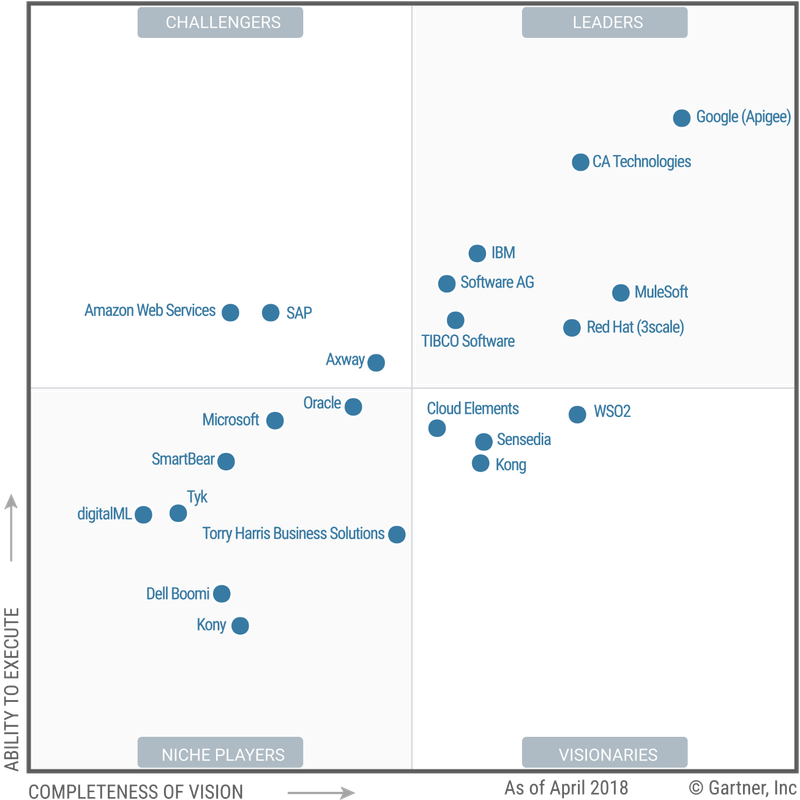
I personally prefer MuleSoft, probably due to the experiences in the past, but as it sometimes happens -  Gartner doesn't fully agree with me. Here's what they've determined for 2019. What do you think?


Kubernetes Proxy: Envoy vs NGINX vs HA Proxy


Having spent quite some time with Linux and Kubernetes admins, I've come to realize that networking isn't one of their strong sides. Being a network guy myself, I feel obliged to share my views on topics as important as this one. So, which proxy should you use in your Kubernetes cluster?

Lets start with some facts:
  • All three of these proxies are highly reliable, L7, proven proxies, with Envoy being the newest kid on the block.
  • All these proxies do an outstanding job of routing traffic L7 reliably and efficiently, with a minimum of fuss.
  • There is no full parity of features, but you can implement any critical missing features in the proxy itself… the power of open source!


To keep the post structure, just a few lines about each of these 3 Proxies:
  • HA Proxy is the default Load Balancer when it comes to Kubernetes. It was initially released in 2006, when the Internet operated very differently than today, ergo… there's an issue of slow adoption of new features. This is very serious when you consider SECURITY, like support for last SSL/TLS versions.
  • NGINX is a high-performance web server, FASTER and more modern then HA Proxy Load Balancer, WAF and so many other things… and if you check out the SDN integrations (Cisco ACI, VMware NSX, Nokia Nuage), these are all based on open source version of NGINX. NGINX open source has a number of limitations, including limited observability and health checks, so it comes down to what you're looking for. If you want an enterprise product, depending on your company environment - go with NGINX Plus, ACI or NSX (be sure to ask for -T).
  • Envoy Proxy is new… so not very mature, BUT - most modern, and used in production in Apple, Google among others. Envoy was designed from the ground up for microservices, with features such as hitless reloads, resilience, and advanced load balancing, plus - and exposing dynamic APIs for configuration. THIS is a big deal, in the world where proxies have been configured using static configuration files (Envoy also supports static config, of course). And lets not forget that Istio Service Mesh, which I'm a big fan and contributor of, uses an extended version of the Envoy proxy.

How I prepared for AWS SA Professional exam

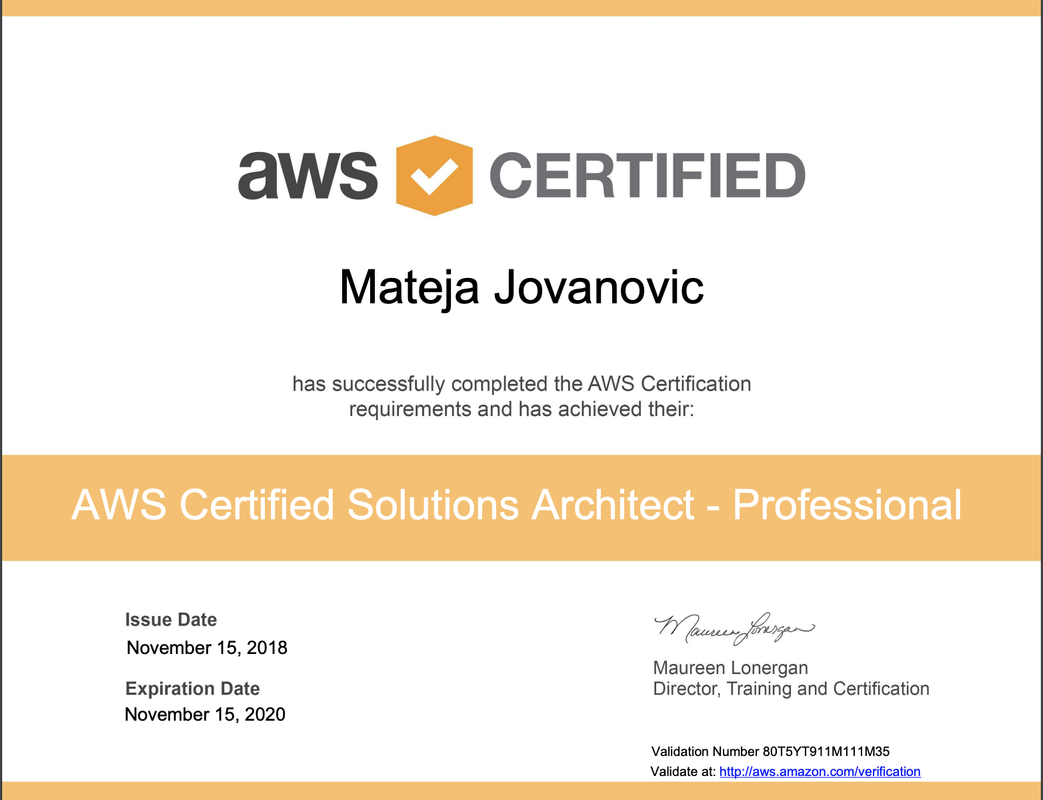
Last week I managed to pass the AWS Solution Architect professional certification exam. Here's my certification, in all its glory:


If you've been following my blog, you'll know that I passed a Google Cloud Professional Architect exam in March. I wrote a few blog posts about how I prepared it, and you may find it all here.

Even though I've been preparing for the AWS exam for quite a while, the two main reasons I went for GCP professional level exam first are simple:

  • I think Google Cloud is a sleeping giant, and I wanted to be among the first certified experts. 
  • AWS has much more services. For a professional level exam you don't just need to know some of them in depth, you need to know ALL of them in depth, in order to make the right architecture that fits the customers requirements.


How I prepared

Simple:

  • Linux Academy has amazing hands-on courses for both Associate and Professional level. In my experience - the only one that really prepare you for this exam.
  • Work experience. This is where it gets tricky… AWS has a wide service catalogue, and your work environment hands is unlikely to cover the entire blueprint.


Difference between AWS Associate and Professional level exams

This is something I get asked a lot. Here is the main difference:

  • To pass the associate level exam, you need to know what each service does. The questions are straight forward, if you know what the service does - you'll eliminate most of the options in your test, and get the right answer.
  • AWS SAP (Solutions Architect Professional) is a real world business problem oriented exam. It's understood that you know all the AWS Service Catalogue in depth, and you are tasked with getting the most optimal architecture based on the customer requirements. You will get 77 different business scenarios (this is a LOT of text, so be prepared), and each one has 4-5 possible answers, which are all correct, you just need to figure out which one is the best for that particular scenario.


This basically means that if the question is how to connect your VPN with your on-premises infrastructure in the most cost efficient way, the answer will vary:

  • In Associate level, you will go with VPN IPSec, cause Direct Connect is more expensive.
  • In Professional level you'll have to go deeper, and it's likely that mapping the use case with the architecture, Direct Connect could come out as the most cost efficient option.


AWS vs GCP professional certifications

This is a tricky one… Basically this is how it is:

  • GCP exam is very, very difficult. I feel like it's a Cloud Architect and DevOps merged into one exam, which makes it quite complex and "uncomfortable" at moments. BUT - GCP doesn’t have nearly as many services as AWS does in the Service Catalogue, so I guess the blueprint is narrower, which kind of justifies the complexity of the exam.
  • AWS is difficult, and long, requires high concentration during the 170 minutes, and probably what I like more - tests you for the real world skills. You will potentially get the same possible architectures as the answers in many different questions, and I feel it's impossible for someone to pass it even if they knew the questions, you really need an architect mind. On the positive side - there are no trick questions, so if you're good - you'll pass, it's as simple as that.


What's next? 

I'm going all in for my VMware VCDX (Design Expert) exam now. Did the design, going for the defence. I think I'm in the point in my career to go for something like this, get roasted for thinking I'm a super architect… Bring it on, my ego is about to be destroyed, but I feel like I'll come out of the experience as a true business architect.

On relevance of CCIE in 2019

A question I've been getting a lot from the Network Engineers, should they go for CCIE. There are two points to this question:

  • Knowledge and skill
  • Value of CCIE as a Certification


Let me get into more detail.

Value of CCIE as gaining skill and knowledge

Networking as such is changing. A network engineer for the cloud era needs to understand programmability, APIs, SDN with its use cases, Public Cloud networking (inter and intra public cloud). BUT, if you've ever talked to a network engineer who doesn't come from hardcore cisco or juniper networking, and rather comes from systems (VMware or Linux), or someone who's just studied something like OpenFlow and considers hardware to be a "commodity", you'll notice how due to lack of basic networking L1-4 concepts, they tend to not understand some limitations in both functionality and performance. There are exceptions, of course, and I want to acknowledge that!!! The point I'm trying to make is that CCIE gives you the best of breed base for any kind of programmable, cloud, Kubernetes or whichever networking-related activity you want to pursue in the future.

Value of CCIE as a Certification

This is a completely different topic. If you want to do your CCIE just because you want more money from your employer - don’t. Go learn AWS, learn Python and Ansible, maybe some ACI and NSX but from the "north side" (API). The days when getting a CCIE meant an immediate salary increase of 50% are over… It is now a step in your trip, not the final goal.

Conclusion

Should you go for a CCIE? Yes. If you are serious about networking, you 100% should. You will learn all that other SDx and Cloud stuff much more easy if you understand bits and bytes. Hey, I passed my Google Cloud, AWS, and NSX highest level technical certifications greatly thanking to the networking knowledge I learned working on the field as a CCIE... I'm just doing Networking in a different way now. But - it's still networking, L2 and L3, same old MAC, IP and BGP, just consumed in a different way.

Just married: IBM and RedHat. What does this mean for Cisco and VMware Multi-cloud offer?

As per yesterdays announcement, IBM is acquiring Red Hat in deal valued at $34 billion (more about this here). This is another one in a row of deals I did not expect to happen:

  • Oracle acquired Sun Microsystems
  • Microsoft acquired GitHub
  • Dell acquired VMware


How disruptive can a Purple Hat really be? VMware survived being acquired by Dell quite well... will RedHat have the same luck, or not? What I know for sure is that the RedHat employees are panicking right now...

Sure, 3k billion is a big sum, but also a bold move by IBM on the conquest to the Multi-Cloud market. Combined we're looking at (to name a few):

  • Ansible for the Automation
  • OpenShift, as the best of breed PaaS based on Kubernetes
  • CloudForms as a potential CMP (I wonder how this will work out...)
  • Watson for all AI/Machine Learning related
  • IBM Cloud as a Public Cloud platform


Is this a winner combo? Or do other Hybrid Cloud promoters, like Cisco and VMware have equally good lock-in-free proposals?


As a Hybrid Cloud and DevOps advocate, and a European CTO, I've had the experience to "casually chat" to many European companies about their Cloud strategy. Two things are evident:

  • The buyer is changing, Multi-Cloud is an APPLICATION strategy, not the infrastructure strategy (read more about this here).
  • Companies don't really know who to trust, as what they're being told by various vendors and providers is not really coherent. This makes is pretty difficult to actually build a Cloud strategy (don't get me started on CEOs who'll just tell you "We've adopted Cloud First", and actually think they have a cloud strategy).


Due to all this:
- IBM and RedHat, as software companies, will be able to get to the Application market.
- Neither of the two can do Infrastructure as well as VMware & Cisco.


How important is this? Very! And here is why.

Cisco has:

  • Cloud Center, a true application oriented micro-services ready CMP, Public Cloud and Automation Tool agnostic, equipped with the right Benchmarking and Brokering tools, that integrates quite well with the infrastructure, and workflow visibility platforms.
  • ACI and Tetration, that enable the implementation of coherent and consistent Network and Security Policy Model across multiple private and public clouds, along with the workload visibility.
  • HyperFlex and CCP, providing enterprise production-ready, lock-in-free Kubernetes solution on a Hyper Converged infrastructure.
  • AppDynamics and Turbonomic, a true DevOps combo for the Day 2 we're all fearing in the Cloud, letting the application architects model their post-installation architecture, and monitor the performance of each element, latency between different elements, and assure the optimal user experience.


VMware has:

  • vRealize Automation, the best of breed Automation and Orchestration Hybrid Cloud ready platform.
  • PKS and VKE, KaaS platforms that provide the enterprise production-ready Kubernetes solution, with a fully prepared Operations component, in both - private and public cloud.
  • Wavefront, application visibility tool running on Containers, designed with Cloud applications and Micro Services in mind, with just insane performance.
  • NSX, including the full SDN stack in both, Data Center and Cloud, with probably the best API (both documentation and usage wise).
  • Partnership with AWS, Azure, GCP and IBM, to leverage the most demanded Hybrid Cloud use cases in a "validated design" fashion.


What does this all mean?

Multi-cloud is still a space that, based on Gartner and IDC, over 90% of Companies are looking at. Big companies are making their moves... so just grab your popcorn, and observe. It's going to be a fun ride!

Why SDN isn't where we thought it would be

The SDN hype started a few years ago. Everyone was talking about it as the next big thing, and it all made so much sense. I started exploring SDN while Nicira and Insieme were just two startups, and got even deeper into it when they were bought by VMware and Cisco and rose as ACI and NSX.

SDN makes perfect sense. A single point of management and operations of the entire data center network, micro Segmentation as an embedded feature, REST API support for automation, possibility to move the workloads between Sites without having to reconfigure the security policy, and a bunch of others. It truly is a missing piece, arriving a bit too late. So… why hasn't the same happened like when we started using server virtualization? Why isn't everyone implementing these technologies, and celebrating the benefits while singing their favourite tune?


In my opinion, two reasons: misleading PowerPoints and vendors with the wrong go to market strategy.

Misleading PowerPoints

Networking tends to be more complex then Compute and Storage in the Data Center. You have a group of independent network devices that need to transfer an insane number of packets between different points, with zero latency, and no time to talk to each other and coordinate the decisions. When you introduce Automation into the equation, it all gets really interesting. With SDN we introduced overlay, and managed to somehow make all this easier. Where is the problem then?

Automation is an awesome concept. If you automate, you will improve the delivery times, and always end up with the same results. Automation is not new… it's been here since the 70s, and even though the execution premises have changed, one thing stays the same:
- If you automate, you will save a lot of time and resources.
- To create automation, you need a lot of knowledge, experience and a lot of time and effort.

The truth about misleading PowerPoints lies in the second point. Everyone rushed to explain to their customers how their SDN has an API, and how you can automate everything in an instance, I saw bonus hungry AMs and SEs singing the songs to the customers about how they can use the automation tool of choice. "There's an API so you're good bro!" Unfortunately, this is far from the truth. Yes, SDN supports automation of your network, but it takes a lot of hard work to set it up right, and if you sold something to the customer without setting their expectations right… well, he will be disappointed.

What is the truth? Both ACI and NSX are mature solutions, but the SDN is no longer a group of independent switches, it needs to be integrated in the wider ecosystem, and it makes all the difference who integrates all this in your Data Center. If the customers were prepared for this from the beginning, I think we'd all bee seeing a whole lot more SDNs.


Vendor Strategy

I'll talk about 2 big ones here - VMware and Cisco. Have you noticed how these two vendors have the same number of production references in each moment? Like there is some kind of secret synchronisation behind the curtain. Ever wondered why that is?

The truth is that both, ACI and NSX, are great products. Yes, GREAT! It's also true that a surprisingly small number of "SDN experts" out there understands HOW and WHY these products need to be introduced in the data center ecosystem, so a majority of the happy SDN customers that Cisco and VMware are referencing are kind of fake, meaning - yes, they are using the product, and yes, it's in production, but it is not used as SDN. Sure, Cisco has DevNet, and VMware has VMware Code, and these are both great initiatives, but they still lack a critical mass… both of them do. [if you don’t know what these are, I STRONGLY recommend that you stop reading this post, and go check out both these websites, they are AWESOME].

What is Cisco's mistake?

Cisco counts on their traditional big partners to deliver ACI. These guys can sell networking to a networking department, they get BGP and VxLAN, they can build the fabric in what Cisco brutally named "a networking mode", and they can train the networking department to use ACI. That’s it. So… what about automation, IAC (infrastructure as code), what about the developers who are actually the true buyer here, and they just need to provision some secure communication for their code? Well, I'm afraid there's nothing here for them, because neither a Cisco's networking partner not the customers networking department are able to configure and prepare the ACI for what these guys really need SDN for. Customer simply isn't getting what they paid for, and they are pretty vocal about it in the social networks, so the product gets bad marketing.

And yes, there are companies out there (such as mine) who are able to implement ACI as a part of a Software Defined ecosystem and help customer build automation around it, but Cisco somehow still isn's seeing the difference, and is still promoting same old networking partners to the customers to implement their ACI. Oh well… let's hope Cisco starts to understanding this before it's late.


What is VMware's mistake?

NSX is an entirely different story. The problem isn't VMware's strategy, but rather - the buyer. SDN is still networking, so the buyer is a Networking Department, but… Networking guys don’t know VMware, they know Cisco and Juniper. On the other hand there are System Admins who are desperate to gain control over network and not depend on the slow networking departments, but… they lack advanced networking knowledge. So NSX, being a brilliant product as it is, ended up in no mans land. VMware did everything to promote NSX to Network experts, if you're a CCIE, like me, you can actually do NSX cert exams without doing the training, and NSX is easy to learn and understand, but still, not enough hype around it among network admins. So, what happened? Well, for now there are many implementations of NSX used the way System and Security experts are able to promote and manage it, Micro Segmentation with some basic networking, but not even close to the NSX full potential, and again - not used as an SDN.


What about the other SDN vendors? 

There are a few worth mentioning: Nokia Nuage, Juniper Contrail, some distributions of OpenDayLight (HP, Dell, Huawei, Ericsson, NEC, etc.). Two things are happening with these guys:

  • Due to all mentioned above, the Customers are under the wrong impression that not even ACI and NSX are fully mature and stable solutions… If Cisco and VMware aren't able to invest what it takes and make it stable, what do you expect from the others?
  • In one moment all these guys made huge investments in their technology, and there was still no sales to support the investment, so - they lowered the prices and started selling the solutions that weren't yet mature. This caused customers dissatisfaction, and the rumor on the market that SDN just "isn't there yet". They can still recover… as long as they actually invest in product development and engineering skills, and let product sell itself. 


What should we expect in the next 2-4 years?

SDN is here to stay, even more so with IoT and Containers with a whole set of new micro Segmentation and Network automation requirements. It just takes it longer then anticipated to find it's place. I think the customers are slowly starting to get the non-planned effort to actually move from installing the SDN product - to using it as a Software Defined technology, which is good, so if you're considering SDN as a potential career path - add some automation and programming skills, and you're on the right track.

Migrate HyperFlex Cluster to a new vCenter

Get ready to have your mind blown. One of the easiest procedures I've encountered. You just need to follow these 3 steps, to migrate the entire HyperFlex vSphere Cluster with all its hosts from vCenter 1 to vCenter 2.

Before you start:

- Your environment might be different. I'm not responsible if something goes wrong, you're welcome to look for the official guides. I've tested it to migrate from vCenter 6.0 to 6.7 in August 2018.
- VDS WILL NOT be migrated automatically, BUT - you can Export it into ZIP from the old vCenter, and import into the new one AFTER you've done all these steps, and the Uplinks will be automatically mapped. Be sure to include all the configuration, portgroups and all, both when you export and import.

Step 1.

Deploy your vCenter Server Appliance. I'll asume you're setting the standard username, administrator@vsphere.local

Step 2.

Create both Datacenter and Cluster in the empty new vCenter. For the ease of migration, use the same names. Connect all ESXi hosts from HyperFlex to the new Cluster. Just accept re-assigning of the licence, and wait to see the new host as Connected.

Step 3. 

Re-register the Cluster to a new vCenter. I recommend that you observe the new vCenter in the background, so that you can follow the progress. To do this you need to SSD into your HyperFlex, and execute the following command (set your own parameters, of course):

stcli cluster reregister --vcenter-cluster CLUSTER_NAME --vcenter-datacenter DATACENTER_NAME --vcenter-password 'NEW_vCENTER_PASSWORD' --vcenter-url NEW_vCENTER_IP --vcenter-user administrator@vsphere.local

You will get this message:

Reregister StorFS cluster with a new vCenter ... [this is where you wait for approx 10 minutes]
Cluster reregistration with new vCenter succeeded


Additional Step:

If you are using VDS, this is when you need to import them to the new vCenter.


And - you're done! Let me know in the comments if it worked as easy as this.

Install PowerCLI on Mac, start using PowerNSX

This is something I've been wanting to publish for a while, and finally my Mac got formatted (no questions will be taken at this point...) and I had to re-install it all, and I just couldn't find the instructions on how to do it without just having to read pages and pages of disclaimers and stuff...

Why PowerCLI? Cause it's a simplest way to automate your vCenter tasks, via the command line, fast and furious. Sure, one day a working vCenter web plugin will come, but who knows when...

Why PowerNSX? Same... but for the NSX admins. Trust me, my life got so much better the day I stopped depending on vCenter Web GUI.

How do I install and start using it? Simple. Just follow this 5 Steps guide...


Step 1: Install PowerShell (check the update below first!!!)

Make sure you have GitHub:

# git

Clone the PowerShell installation package from GitHub:
# git clone --recursive https://github.com/PowerShell/PowerShell

Once you got it, enter the Folder, and install the package (you'll be asked for a Password a few times):
Submodule path 'src/libpsl-native/test/googletest': checked out 'c99458533a9b4c743ed51537e25989ea55944908'


MatBook-Pro:~ mjovanovic$ cd /Users/mjovanovic/PowerShell
MatBook-Pro:PowerShell mjovanovic$ ./tools/install-powershell.sh

Get-PowerShell Core MASTER Installer Version 1.1.1
Installs PowerShell Core and Optional The Development Environment

Run "pwsh" to start a PowerShell session.
*** NOTE: Run your regular package manager update cycle to update PowerShell Core
*** Install Complete


MatBook-Pro:PowerShell mjovanovic$ pwsh
PowerShell v6.0.2
Copyright (c) Microsoft Corporation. All rights reserved.

https://aka.ms/pscore6-docs
Type 'help' to get help.

PS /Users/mjovanovic/PowerShell>

You're in the PowerShell!!!

UPDATE: As of December 2018, this method is no longer supported. You'd actually get into a quite "nifty" catch 22, where PowerShell 6.1.1 doesn't support most of relevant PowerCLI Commands, New PowerCLI doesn't support anything under 6.0.5, and some PowerNSX Commands require 6.0.1 and above. Awesome!

SOLUTIONDownload PowerShell 6.0.5, that one works! Download it as a package, and install. The rest of the post remains the same.


Step 2: Install PowerCLI

Now lets procede with the PowerCLI. More details on this Link, if you happen to need more details... but basically all you need is the following command: https://blogs.vmware.com/PowerCLI/2018/03/installing-powercli-10-0-0-macos.html


PS /Users/mjovanovic/PowerShell> Install-Module -Name VMware.PowerCLI -Scope CurrentUser

Untrusted repository
You are installing the modules from an untrusted repository. If you trust this repository, change its InstallationPolicy value by running the Set-PSRepository cmdlet. Are you sure you want to install
the modules from 'PSGallery'?
[Y] Yes  [A] Yes to All  [N] No  [L] No to All  [S] Suspend  [?] Help (default is "N"): Y


Step 3: Install PowerNSX Modules

Ok, so now we just need to install the PowerNSX Modules:

PS /Users/mjovanovic/PowerShell> Find-Module PowerNSX | Install-Module -scope CurrentUser

Untrusted repository
You are installing the modules from an untrusted repository. If you trust this repository, change its InstallationPolicy value by running the Set-PSRepository cmdlet. Are you sure you want to install
the modules from 'https://www.powershellgallery.com/api/v2/'?
[Y] Yes  [A] Yes to All  [N] No  [L] No to All  [S] Suspend  [?] Help (default is "N"): Y

Step 3.1: Resolve the Certificate Error:
If you tried to connect to your vCenter now, you´d get this error:
Connect-VIServer : 06/08/2018 18:32:43 Connect-VIServer Error: Invalid server certificate. Use Set-PowerCLIConfiguration to set the value for the InvalidCertificateAction option to Ignore to ignore the certificate errors for this connection.

Before Logging in to your vCenter, to avoid the Certificate problems (which you will most definitely have), first use, You need to set the Certificate Errors to FALSE:

PS /Users/mjovanovic/PowerShell> set-PowerCLIConfiguration -InvalidCertificateAction Ignore

Perform operation?
Performing operation 'Update PowerCLI configuration.'?
[Y] Yes  [A] Yes to All  [N] No  [L] No to All  [S] Suspend  [?] Help (default is "Y"): Y

PS /Users/mjovanovic/PowerShell>


Step 4: Log into the NSX Manager and vCenter

Now you are GOOD TO DO, you can Log in to your NSX, and to the vCenter:

PS /Users/mjovanovic/PowerShell> Connect-NsxServer -NsxServer 10.20.70.18 -Username admin -Password M4TSCL0UD

PowerNSX requires a PowerCLI connection to the vCenter server NSX is registered against for proper operation.
Automatically create PowerCLI connection to 10.20.70.37?
[Y] Yes  [N] No  [?] Help (default is "Y"): Y

WARNING: Enter credentials for vCenter 10.20.70.37

PowerShell credential request
Enter your credentials.
User: administrator@vsphere.local
Password for user administrator@vsphere.local: **************

Version             : 6.4.0
BuildNumber         : 7564187
Credential          : System.Management.Automation.PSCredential
Server              : 10.20.70.18
Port                : 443
Protocol            : https
UriPrefix           :
ValidateCertificate : False
VIConnection        : 10.20.70.37
DebugLogging        : False
DebugLogfile        : \PowerNSXLog-admin@10.20.70.18-2018_06_08_18_37_32.log


Step 5: Start using PowerNSX

You can do so many things here! I recommend this Guide to get you started:
https://www.vmware.com/content/dam/digitalmarketing/vmware/en/pdf/products/nsx/vmware-automating-vsphere-with-powernsx.pdf

Most important command:
PS /Users/mjovanovic> get-command -module PowerNSX                                                                                                                                 

CommandType     Name                                               Version    Source                                                                                              
-----------     ----                                               -------    ------                                                                                              
Function        Add-NsxDynamicCriteria                             3.0.1118   PowerNSX                                                                                            
Function        Add-NsxDynamicMemberSet                            3.0.1118   PowerNSX                                                                                            
Function        Add-NsxEdgeInterfaceAddress                        3.0.1118   PowerNSX                                                                                            
Function        Add-NsxFirewallExclusionListMember                 3.0.1118   PowerNSX                                                                                            
Function        Add-NsxFirewallRuleMember                          3.0.1118   PowerNSX                                                                                            
Function        Add-NsxIpSetMember                                 3.0.1118   PowerNSX                                                                                            
Function        Add-NsxLicense                                     3.0.1118   PowerNSX                                                                                            
Function        Add-NsxLoadBalancerPoolMember                      3.0.1118   PowerNSX                                                                                            
Function        Add-NsxLoadBalancerVip                             3.0.1118   PowerNSX                                                                                            

Function        Add-NsxSecondaryManager                            3.0.1118   PowerNSX                     
...

Just play around with these!

How I passed Google Certified Professional Cloud Architect Exam

After a few months of heavy preps, I managed to pass the exam. I got the electronic certificate, and supposedly I'll get a Cloud Architect Hoodie! Yeah, I'm gonna wear it :)


The exam is every bit as difficult as advertised. I did A LOTS of Hands On in the Google Cloud Platform (the 300$ that Google gives you to play around comes in quite handy), without it I don't think it's possible to pass, bunch of questions have commands to choose from, and a heavy focus on App Development and Linux Commands. If you want to know how I prepared, check out my previous posts:

  1. Why I decided to become a Certified Cloud Architect, why Google Cloud, and how I want to prepare
  2. Introduction to Big Data and Hadoop
  3. Google Cloud - Compute Options (IaaS, PaaS, CaaS/KaaS)
  4. Google Cloud - Storage and Big Data Options
  5. Google Cloud - Networking and Security Options


Stay tuned, my Cloud is about to get much more DevOps-y in 2018!

Public Cloud Networking and Security: VPCs, Interconnection to Cloud, Load Balancing


I'm so happy to finally be here, at the Networking part of the Public Cloud!!! I know, there are more important parts of Cloud then Networks, but SDN is my true love, and we should give it all the attention it deserves.

IMPORTANT: In this post I will be heavily focusing on Google Cloud Platform. The concepts described here apply to ANY Public Cloud. Yes, specifics may vary, and in my opinion GCP is a bit superior to AWS and Azure at this moment, but if you understand how this one works - you'll easily get all the others.

Virtual Private Cloud (VPC)

VPC (Virtual Private Cloud) provide global scalable and flexible networking. This is an actual Software Defined Network provided by Google. Project can have up to 5 VPC - Virtual Private Networks. VPC can be global, and contains subnets and uses a private IP space. Subnets are regional. The network that you are provided with VPC is:

  • Private
  • Secure
  • Managed
  • Scalable
  • Can contain up to 7000 VMs

Once you create the VPC, you have a cross-region RFC1918 IP Space network, using Googles private Network underneath. It uses the Global internal DNS, load balancing, firewalls, routes, and you can scale rapidly with global L7 Load Balancers. Subnets within VPC can only exist within Region/Zone, you can't extend a Subnet over your entire VPC.

VPC Networks can be provisioned in:
  • Auto Mode, where the Subnet(s) is set (automatically assigned) in every region. Firewall rules and routes are preconfigured.
  • Custom mode, where we have to manually configure the subnets.

IP Routing and Firewalling


Routes are defined for the networks to which they apply, and you can use them if you want to apply the route only for the Instances with a certain "instance tag" (If you don't specify the TAG, the route applies to all the instances).

When you use the Routes to/from the Internet, you have 2 options:

Project can contain various VPCs (Google allows you to create up to 5 VPCs per project). VPCs also have Multi Tenancy. All the resources in GCP belong to some VCP.  Routing and Forwarding must be configured to allow traffic within VPC, and with the outside world. You also need to configure the Firewall Rules.

VPCs are GLOBAL, meaning the Resources can span anywhere around the world. Even so, instances from different regions CANNOT BE IN THE SAME SUBNETAn instance needs to be in the same region as a reserved static IP address. The zone in the region doesn't matter.

Firewall Rules can be based on the Source IP (ingress) or Destination IP (Egress) There are DEFAULT "allow egress" and "deny ingress" rules, which are pre-configured for you, with the minimum priority (65535). This means that if you configure the new FW rules with the lower number/higher priority, these will be taken into account, instead of the default ones. GCP Firewall rules are STATEFUL. You can also use TAGs and Service Accounts (something@developer.blabla.com for example) to configure the Firewall rules, and this is probably THE BIGGEST advantage of the Cloud Firewall, because you can do Micro Segmentation in a native way. Once you create a Firewall Rule, a TAG is created, so the next time you create an instance, and apply that rule, it will not create it again, just attach the TAG to your instance.

There are 2 types of IP addresses in VPC:
- External, in the Public IP space
- Internal, in the Private IP space

VPCs can communicate to each other using a Public IP space (External networks visible on the Internet). External IP can also be ephemeral (change every 24 hours) or static. VMs don't know what their external IP is. IMPORTANT: If you RESERVE an External IP in order to configure it as STATIC, and not use it for an Instance or a LB - you will be charged for it! Once you assign it - it's for free.

When you work with Containers - containers need to focus on the Application or Service. They don't need to do their own routing, it simplifies the traffic management.

Can I use a single RFC 1918 space within few GCP Projects?

Yes, using a Shared VPC - Networks can be shared across Regions, Projects etc. If you have different Departments that need to work on the same Network resources, you'd create two separate projects for them, give the access only to the project they work on, and use a single Shared VPC for the Network resources they all need to access.
  

Google Infrastructure

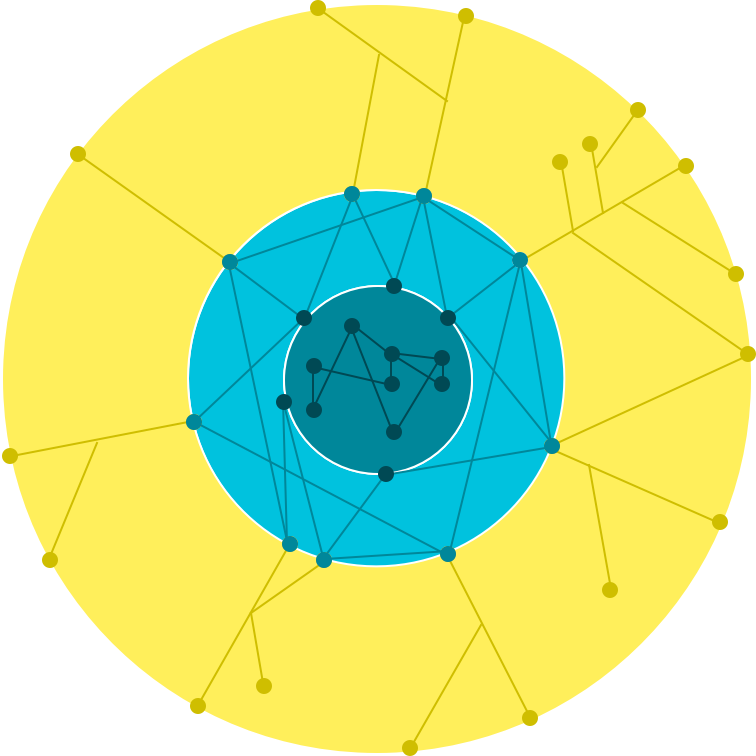
Google's network infrastructure has three distinct elements:
  • Core data centers (central circule), used for the Computation and Backend storage.
  • Edge Points of Presence (PoPs), Edge Points of Presence (PoPs) are where we connect Google's network to the rest of the internet via peering. We are present on over 90 internet exchanges and at over 100 interconnection facilities around the world.
  • Edge caching and services nodes (Google Global Cache, or GGC). Our edge nodes (called Google Global Cache, or GGC) represent the tier of Google's infrastructure closest to our users. With our edge nodes, network operators and internet service providers deploy Google-supplied servers inside their network.


CDN (Content Delivery Network) is also worth mentioning. It's enabled by Edge Cache Sites (Edge PoPs, or the light green circule above), the places where the online content can be delivered closer to the users for faster response times. It works with Load Balancing, and the Content is CACHED in 80+ Edge Cache Sites around the globe. unlike most CDNs, your site gets a single IP address that works everywhere, combining global performance with easy management — no regional DNS required. For more information check out the official Google docs.


Connecting your environment to GCP (Cloud Interconnect)

While this may change in the future, a VPN hosted on GCP does not allow for client connections. However, connecting a VPC to an on-premises VPN (not hosted on GCP) is not an issue.

There are 3 ways you can connect your Data Center to GCP:
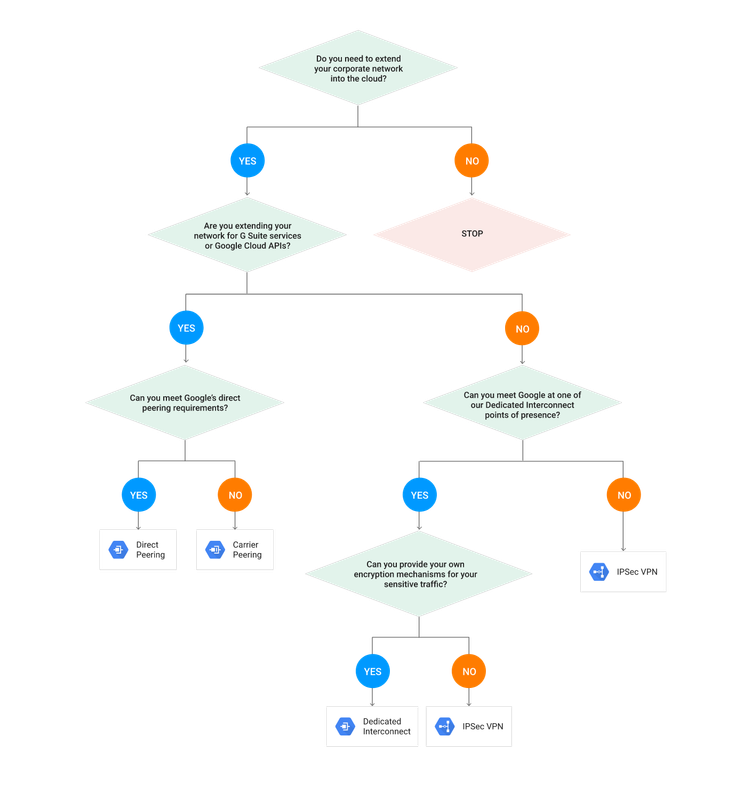
  • Cloud VPN/IPsec VPN, as in a standard Site to Site VPN IPsec session (supports IKEv1 and v2). Supports up to 1,5-3 Gbps per tunnel, but you can set up various to increase performance. You can also use this option to connect different VPCs to each other, or your VPC to other Public Cloud. Cloud Router is not required for Cloud VPN, but it does make things a lot easier, by introducing the Dynamic Routing between your DC and GCP, that supports BGP. When using static routes, any new subnet on the peer end must be added to the tunnel options on the Cloud VPN gateway options.
  • Dedicated Interconnect, used if you don’t want to go via Internet, and you can meet Google in one of Dedicated Interconnect points of presence. You would be using Google Edge Location (you can connect into it Directly, or via Carrier), with Google Peering Edge (PE) device to which your physical Router (CE) connects [you need to be in the supported location - Madrid is included]. This is not cheap, currently around 1700$ per 10Gbps link, 80GB Max!
  • Direct Peering/Carrier Peering, which Google does not charge for, but also - there is no SLA. Peering is a private connection directly into Google Cloud. It's available in more locations then Dedicated Interconnect, and it can be done directly with Google (Direct Peering) if you can meet Google's direct peering requirements (Requires you to have a connection in a colocation facility, either directly or through a carrier provided wave service), or via a Carrier (Carrier Peering).

And, as always, Google provides a Choice Chart if you're not sure which option is for you:

How do I transfer my data from my Data Center to GCP?

When transferring your content into the cloud, you would use the "gsutil" command line tool, and have in mind:
  • Parallel uploads (-o, plus you need to set the parameters) are for breaking up larger files into pieces for faster uploads.
  • Multi-threaded uploads (-m) are for large numbers of smaller files.  If you have bunch of small files, you should group together and compress.
  • You can add multiple Cloud VPNs to reduce the transfer time.
  • gsutil by default will by default occupy the entire bandwidth. There are tools to optimize this. When it fails, gsutil will retry by default.
  • For ongoing automated transfers, use a cron job.

Google Transfer Appliance is a new thing, probably not in the exam, it allows you to copy all your data, ship it to google, and they will load it to the Cloud for you.


Load Balancing in GCP

One of the most important parts of Google Cloud, because it enables the Elasticity, much needed in the cloud, by providing the Auto Scaling for the Managed Instance Groups.

Have in mind that the Load Balancing services for the GCE and GKE work in a different ways, but basically they achieve the same thing - Auto Scaling. Here is how this works:
  • In GCE there is a managed group of instances generated from the same template (Managed Instance Group). By enabling a Load Balancing service, you're getting a Global URL for your Instance Group, that includes the Health check service launched from the Balancer to the Instances, which is the base trigger of the Auto Scaling.
  • In GKE you'd have a Kubernetes Cluster, and the entire Elastic operation of your containers is one of the signature functionalities of the Kubernetes Cluster, so you don't have to worry about configuring any of this manually.

Let's get deeper into the types of the Load Balancing (LB) service in GCP. Have in mind that you should always have in mind the ISO-OSI model, and if you can provide the LB service on the high level - go for it! This means that if you can do a HTTPS Balancing, rather go for that then SSL. If you can't go HTTPS - go for SSL. If your traffic is not encrypted - sure, go for TCP. Only if NONE of this works for you, you should settle for the simple Network LB Service.

IMPORTANT: Whenever you are using one of the encrypted LB Services (HTTPS, SSL/TLS), the Encryption terminates on the Load Balancer, and then the proper Load Balancer established a separate encrypted tunnel to each of the Active Instances.

There are 2 types of Load Balancing on GCP:
  1. EXTERNAL Load Balancing, for an access from the OUTSIDE (Internet)
    1. GLOBAL Load Balancing:
    • HTTP/HTTPS Load Balancing
    • SSL Proxy Load Balancing
    • TCP Proxy Load Balancing
    1. REGIONAL Load Balancing:
    • Network Load Balancer (notice that the Network Load Balancer is NOT Global, only available in a single region)
  2. INTERNAL, for the inter-tier access (example - web servers accessing Data Bases)
  

Most Popular Posts